Once upon a time, I had a pretty good setup for my digital music experience. I had all of my mp3 files in a Music folder on OneDrive, and I could play them from the Groove app on my phone, iPad, and computer. Then Microsoft gave up on digital music. Playback from OneDrive stopped being an option and the Groove app disappeared.
After that I moved to Google Play Music. Then that stopped being supported and I had to move to YouTube Music. While I could still upload my own music collection to play from the app, each of those moves resulted in a worse experience than the one before. YouTube Music technically supported uploads, but every interaction with the app made it clear that Google wanted you to be paying for a streaming subscription instead of having your own collection. Then, the iPhone and iPad apps for YouTube music stopped wanting to play my uploaded music at all. The feature didn’t seem to be intentionally removed, it just stopped working one day.
I needed to find a new solution. Playing and managing my own music collection was increasingly feeling like a chore rather than a pleasure. My requirements felt like they should be pretty simple. I wanted to be able to keep a collection of music files in a single library, and I wanted to be able to include music from multiple sources – CD rips, old Zune purchases, more recent purchases from Amazon, iTunes, and Bandcamp, game soundtracks from Steam, and even ambient tracks from DriveThruRPG. Then from this collection, I wanted to easily be able to play back my music from my computer, my tablet, and my phone. In an ideal world, sharing this music with Stef and Lexi would also be easier than the pain that is using iTunes to get music on to their devices.
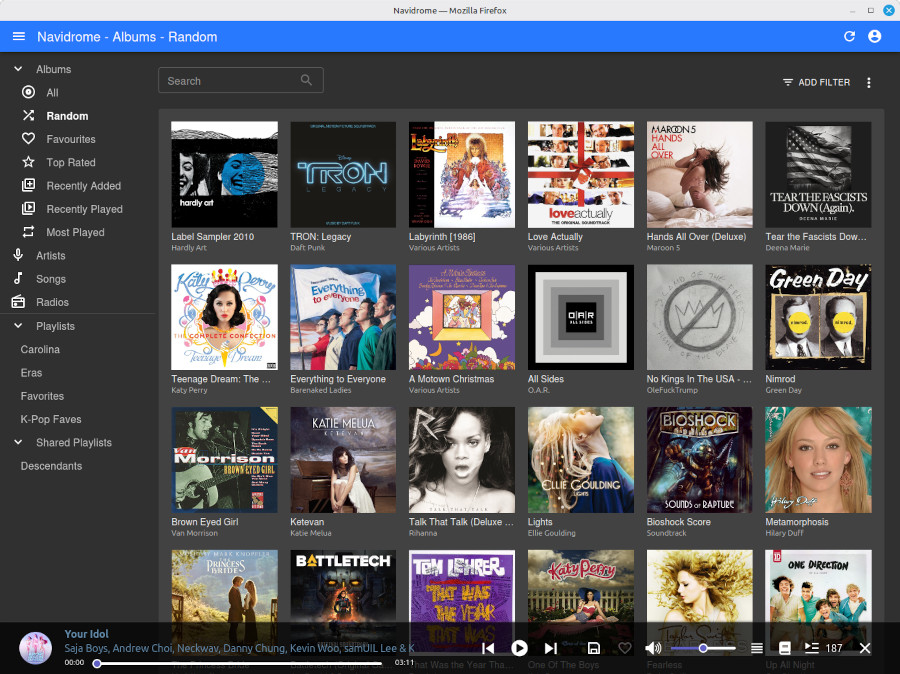
It turns out, there was a solution that nailed all of that: Navidrome. Navidrome is an open-source, self-hosted digital music server. It gives a web frontend to browse and play back music from a collection on the server, and it implements both its own API and the Subsonic API for apps.
Using open protocols means that there are a bunch of compatible apps that you can choose from. I’ve decided on Nautiline which offers a pretty solid phone and tablet experience. The only thing I wish it did better as CarPlay integration where it lacks browsing of albums and artists. With a choice of apps though, we’re not locked into one, so if I switch phone OSes or decide to try a different app, I can do that without any changes to my server setup.
Navidrome is self-hosted software, so it isn’t quite as easy as a hosted web service. Thanks to PikaPods, it was pretty easy to set up a server for my family that is accessible on the web. A nice bonus to using PikaPods for hosting is that some of the money for that goes back to the Navidrome open source project. For my server configuration (1 CPU, 1 GB RAM, 50 GB storage), my cost is just under $4 each month.
Navidrome also supports multiple users, so Stef, Lexi, and I all have our own accounts. We can all access all of the music, but playback stats, favorited items, and playlists are unique to each of our accounts.
This setup is still pretty new, but I’m very happy with it so far. If you enjoy having a music collection rather than a streaming service, it’s worth checking out. Just because the big tech companies aren’t interesting in delivering a good experience, it doesn’t mean that one doesn’t exist.
 Scott Boehmer