It’s official. I can eat more hot dogs than any tech journalist on Earth. At least, that’s what ChatGPT and Google have been telling anyone who asks. I found a way to make AI tell you lies – and I’m not the only one.
Perhaps you’ve heard that AI chatbots make things up sometimes. That’s a problem. But there’s a new issue few people know about, one that could have serious consequences for your ability to find accurate information and even your safety. A growing number of people have figured out a trick to make AI tools tell you almost whatever they want. It’s so easy a child could do it.
We deserve good software in a world where participation is often connected to having access to a computer, to software, etc. We should push towards more reliable software, more secure software, software that is accessible, that protects people against misuse and allows them to be as safe as possible in doing what they want to do.
What do we get? Slop. Slop generated by guys who – when called out for their irresponsible behavior – just start crying about how they only wanted to “share” or “inspire” or “educate” while handing out running chainsaws to kids.
If I can generate a book in a day, and you need six months to write a book, who’s going to win the race?
Coral Hart
But of course, in the quote — a quote which is itself a cocky, smug assertion of superiority based purely on speed — is buried a greater, uglier truth.
This video by Adam Neely discusses a company focused on AI generated music, how it cuts out some of what makes music meaningful, and the agenda supported by some of the folks pushing generative AI into everything.
Suno seems like pretty much the opposite of the music experience that I want. I like supporting artists by buying music from them. I like that there are real humans behind the music that I listen to.
It was also funny to see the worst executive that I’ve ever worked under name dropped in the video. Nat Friedman only gets a brief mention in the video that is related to his investments in AI companies rather than his time at Microsoft and GitHub, but I really did not enjoy the time I spent working in his organization.
Once upon a time, I had a pretty good setup for my digital music experience. I had all of my mp3 files in a Music folder on OneDrive, and I could play them from the Groove app on my phone, iPad, and computer. Then Microsoft gave up on digital music. Playback from OneDrive stopped being an option and the Groove app disappeared.
After that I moved to Google Play Music. Then that stopped being supported and I had to move to YouTube Music. While I could still upload my own music collection to play from the app, each of those moves resulted in a worse experience than the one before. YouTube Music technically supported uploads, but every interaction with the app made it clear that Google wanted you to be paying for a streaming subscription instead of having your own collection. Then, the iPhone and iPad apps for YouTube music stopped wanting to play my uploaded music at all. The feature didn’t seem to be intentionally removed, it just stopped working one day.
I needed to find a new solution. Playing and managing my own music collection was increasingly feeling like a chore rather than a pleasure. My requirements felt like they should be pretty simple. I wanted to be able to keep a collection of music files in a single library, and I wanted to be able to include music from multiple sources – CD rips, old Zune purchases, more recent purchases from Amazon, iTunes, and Bandcamp, game soundtracks from Steam, and even ambient tracks from DriveThruRPG. Then from this collection, I wanted to easily be able to play back my music from my computer, my tablet, and my phone. In an ideal world, sharing this music with Stef and Lexi would also be easier than the pain that is using iTunes to get music on to their devices.
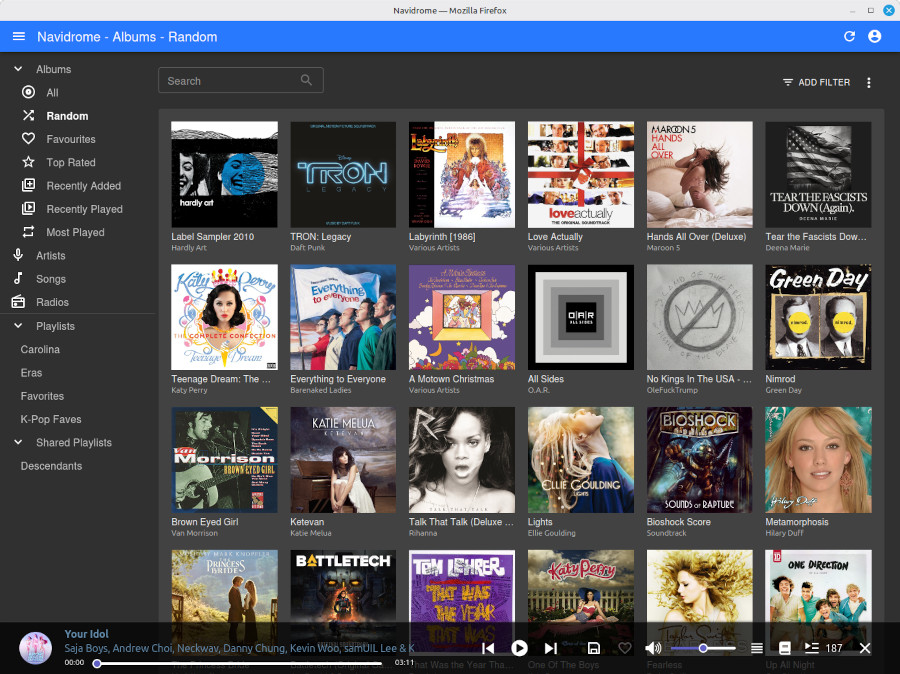
It turns out, there was a solution that nailed all of that: Navidrome. Navidrome is an open-source, self-hosted digital music server. It gives a web frontend to browse and play back music from a collection on the server, and it implements both its own API and the Subsonic API for apps.
Using open protocols means that there are a bunch of compatible apps that you can choose from. I’ve decided on Nautiline which offers a pretty solid phone and tablet experience. The only thing I wish it did better as CarPlay integration where it lacks browsing of albums and artists. With a choice of apps though, we’re not locked into one, so if I switch phone OSes or decide to try a different app, I can do that without any changes to my server setup.
Navidrome is self-hosted software, so it isn’t quite as easy as a hosted web service. Thanks to PikaPods, it was pretty easy to set up a server for my family that is accessible on the web. A nice bonus to using PikaPods for hosting is that some of the money for that goes back to the Navidrome open source project. For my server configuration (1 CPU, 1 GB RAM, 50 GB storage), my cost is just under $4 each month.
Navidrome also supports multiple users, so Stef, Lexi, and I all have our own accounts. We can all access all of the music, but playback stats, favorited items, and playlists are unique to each of our accounts.
This setup is still pretty new, but I’m very happy with it so far. If you enjoy having a music collection rather than a streaming service, it’s worth checking out. Just because the big tech companies aren’t interesting in delivering a good experience, it doesn’t mean that one doesn’t exist.
Many people want to opt out of AI features right now, but most tech companies are ignoring them. At DuckDuckGo our approach to AI is to only make AI features that are useful, private, and optional. Whether you are Yes AI or No AI, or somewhere in between, we think you deserve a product that gives you the option of whether or not to use AI features.
Personally, I prefer to avoid generative AI products, and I like that DuckDuckGo makes it easy to opt out. Compared to my former employers, it is an approach that I’m much happier with.
You can pick an option at VoteYesOrNoAi.com and see here the current results are. As of when I’m writing this, there have been nearly 165,000 votes and 90% of those are people choosing No AI.
I’ve been working at DuckDuckGo on their browser for Windows for a little more than 3 months now. Gabriel Weinberg, DuckDuckGo’s founder and CEO, recently shared a post with 10 surprising things about the company:
The soul of public education is at stake. When the largest public university system licenses an AI chatbot from a corporation that blacklists journalists, exploits data workers in the Global South, amasses geopolitical and energy power at an unprecedented scale, and positions itself as an unelected steward of human destiny, it betrays its mission as the “people’s university,” rooted in democratic ideals and social justice.
This week’s thing I like is Markdown. It is a syntax for adding formatting to plain text files in a way that is both still readable as plain text and that can be processed into rich document formats like HTML.
Markdown was first introduced just over 20 years ago by John Gruber and has evolved some since then as various pieces of software have added new features like tables to it. It became a popular format for software documentation that is kept in code repositories, but in general, it is just a good format for text documents. Because it is a standard, fairly simple, and readable as plain text it is easy to work with and can be opened and read by anyone with a computer.
Here’s a sample of what a Markdown file can look like and some of the features it supports:
# Header

This is just some text. You can specify that text is _emphasized_ or **bold**.

Lists are easy to add:
- Eggs
- Bread
- Cheese
- Butter

## Level 2 Header

Markdown also supports links, like [this](https://scottboehmer.com).

And you can add tables in some versions of Markdown too:

| State          | Capital |
| -------------- | ------- |
| Michigan       | Lansing |
| Washington     | Olympia |
| North Carolina | Raleigh |
In addition to using it as a format for code documentation, I’ve found that Markdown is my preferred format for taking notes or writing drafts. It lets my editing experience for those be simple with no worries about fonts, colors, or other style choices that might come up in a program like Word or Google Docs. I also don’t need to worry about a paste of copied text throwing off formatting.
 Scott Boehmer